



Spotify is rolling out Playlist Notes, a new feature that lets users add personal notes to songs, podcast episodes, and audiobooks in their playlists.
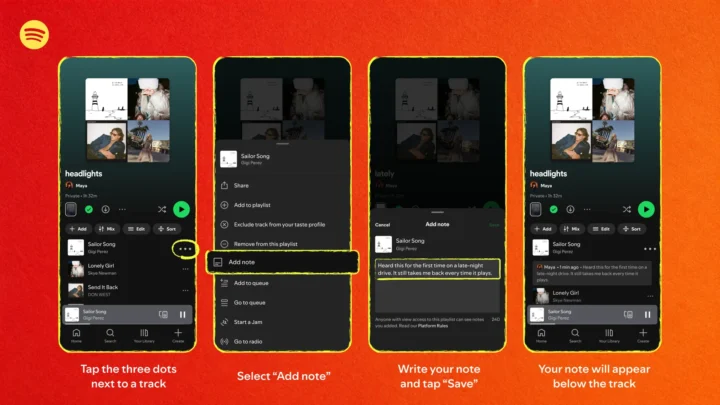
The feature is designed to give playlist creators a way to add context to their selections, whether it is a memory, recommendation, or explanation of why a particular track was included.
- Add notes to songs, podcast episodes, and audiobooks
- Available on iOS and Android
- Rolling out in 100+ markets
- Notes can be added to playlists you own or collaborate on
- Anyone who can view the playlist can also see the notes
- Spotify editors can add notes explaining their playlist selections
- Editor Profiles show an editor’s top tracks, albums, and playlists
Spotify says its editorial teams will also use Playlist Notes to explain the reasoning behind selections on some of its major playlists. Notes can highlight why a track matters, its cultural relevance, or why it fits a particular playlist.
The editorial version of Playlist Notes and Editor Profiles is currently rolling out to Free and Premium users aged 16 and older in the US, Canada, UK, Ireland, Australia, and New Zealand. It initially appears on playlists including Today’s Top Hits, RapCaviar, Hot Country, All New Pop, mint, and Fresh Finds Hip-Hop.
Users can tap Notes at the top of participating playlists to view them. Editor Profiles can be accessed by tapping an editor’s name next to a note or at the top of the playlist.
Spotify also says notes from editors can appear in Now Playing, even when a user is listening to a song outside the playlist where the note originally appeared.
For user-created playlists, Playlist Notes are currently rolling out on iOS and Android in more than 100 markets globally. Availability may vary by market.
To add a note, open a playlist you own or collaborate on, tap the three-dot menu next to a track, podcast episode, or audiobook, select Add note, enter the text, and tap Save.